Microsoft 365 Work Orchestration

Your project and work management, orchestrated inside Microsoft 365.

Orchera unites the work in Planner, Teams, and the tools you already use, with project, portfolio, and resource management built in. Innovative-e gets it live in as fast as two weeks.

See Orchera in action
“With Innovative-e's experience, guidance, and the [Orchera] product, we have successfully implemented a tool that will allow for increased transparency, capacity awareness, and overall ability to optimize our project performance.”

Kurt Mithoefer

Kurt Mithoefer

VP of Planning, Southern New Hampshire University

Read the SNHU story →

Innovative-e

8x  Microsoft Partner Award Winner, 2019–2025

Orchera, formerly Teams4PM
SOC 2 Type 2 badge

Validated Microsoft Teams app
SOC 2 Type 2 attested

THE CHALLENGE

The problem isn't the tools. It's what connects them.

Blue line

Project managers become human integration engines, stitching status together by hand while the real work waits.

Microsoft 365 gives teams excellent places to plan, collaborate, and get work done. But as work spreads across apps and teams, leaders lose the single, governed view they need to run a portfolio.

Collaboration tools aren't a portfolio layer

Planner and Teams are built for getting work done. Intake, prioritization, portfolio visibility, and enterprise reporting need a governed layer on top.

Work lives in more than one place

Projects run in Planner, Teams, Excel, email, and often tools outside Microsoft 365. Forcing everything into one app usually adds friction instead of removing it.

Non-Microsoft PPM creates new problems

Moving portfolio management to a separate platform means more integration, duplicated data, another experience to learn, and processes bent to fit someone else's software.

WHAT CHANGES WITH ORCHERA

From chasing status to running the portfolio

Blue line

Before

Status assembled by hand from Planner, Teams, spreadsheets, and email

With Orchera

Status rolls up from Planner and Teams into one live portfolio view

Before

Work scattered across apps, so leaders get different answers to the same question

With Orchera

One governed information model, so leaders see the same picture

Before

A separate PPM tool that asks people to leave Teams, and slowly stops getting used

With Orchera

Teams keep working in Teams and Planner, with the portfolio layer inside Microsoft 365

THE ORCHERA LAYER

One orchestration layer across the way you actually work.

Blue line

Orchera orchestrates project, portfolio, and resource management inside Microsoft 365, and surfaces work from tools like Monday.com.

If you run the PMO

Stop assembling status. The portfolio view builds itself from the work your teams are already doing.

If you manage projects

Stay in Teams and Planner. No second tool, no double entry, no Friday report scramble.

If you lead the business

Walk into every meeting with the same picture, the same numbers, and no “which version is this?”

HOW IT FITS TOGETHER

Microsoft 365 and Orchera, working as one system

Blue line

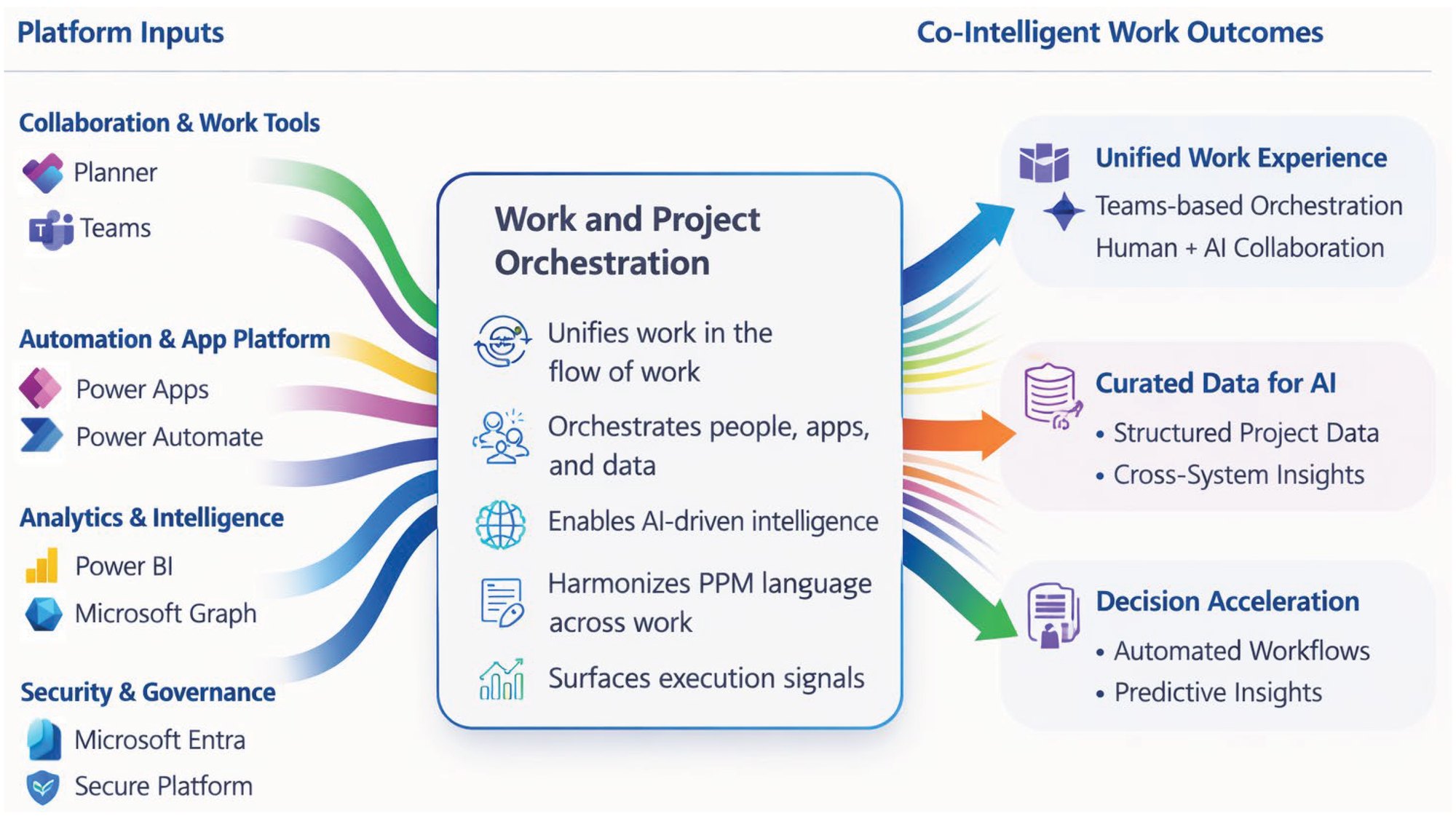
Orchera work and project orchestration model. Platform inputs from Microsoft 365, including Planner, Teams, Power Apps, Power Automate, Power BI, Microsoft Graph, Microsoft Entra, and secure platform services, flow into Orchera, which unifies work in the flow of work, orchestrates people, apps, and data, enables AI-driven intelligence, harmonizes PPM language across work, and surfaces execution signals. Outcomes: a unified, Teams-based work experience with human and AI collaboration, curated structured project data for AI, and decision acceleration through automated workflows and predictive insights.

Click the diagram to view it full size.

Work from tools like Monday.com is surfaced through Orchera today. Smartsheet, Jira, and Azure DevOps are coming. Your Foundation Activation scope sets which work sources and capabilities we configure first.

Your business shouldn't have to conform to someone else's PPM system.

Every organization has its own governance, workflows, and information needs. Because Orchera is integrated into Microsoft 365 and designed around how you actually operate, it fits your organization instead of forcing people into a rigid external application.

Standardize what should be standard.

Configure what makes your business different.

FOUNDATION ACTIVATION

Your Orchera foundation, live in as fast as two weeks.

Blue line

Foundation Activation is Innovative-e's fixed-scope engagement to get a governed Orchera environment running, without a big transformation project. We configure it around your priority requirements, set up core visibility and governance, and enable your administrators.

✓  As fast as two weeks✓  Fixed scope✓  Fixed fee + Orchera subscription✓  A working foundation

Activation is where it starts. Adopt and Expand are where you take it.

Activate

01  Activate

Get Orchera configured, governed, and working in your Microsoft 365 environment. This is Foundation Activation.

Adopt

02  Adopt

Put Orchera to work. As your teams use it, you learn how you want to operate and shape it to fit.

Expand

03  Expand

As you build proficiency on a common context, extend into advanced PPM, more work sources, automation, resource and financial capabilities, and deeper AI.

WHAT'S INCLUDED

What we set up together

Blue line

Included in Foundation Activation

  • ✓Orchera activation and foundational configuration
  • ✓A governed project and workspace structure
  • ✓Planner and Teams alignment
  • ✓A project and portfolio information model
  • ✓Governance standards, visibility, and reporting
  • ✓Configuration for the priority requirements agreed in your activation scope
  • ✓Administrator enablement and an expansion roadmap

What you'll have at the end

When we hand off, your team is running on a foundation it owns.

Live and governed

Orchera running in your Microsoft 365 environment, with governance built in from day one.

One version of the truth

Consistent project and portfolio information, so leaders see the same picture.

Owned by your team

Trained owners and administrators, plus a repeatable structure for every new project.

A clear path forward

A prioritized roadmap to deeper PPM, automation, and AI.

COMMON CONTEXT

Better context drives better outcomes, and better AI.

Blue line

Copilot is only as good as the work data it can reach. Fragmented work creates fragmented context, for people and for Copilot. Orchera establishes a governed common context across your work, so every layer built on top of it gets smarter.

Management insightCopilotAgentsAI-enabled business processes

FREQUENTLY ASKED QUESTIONS

Microsoft 365 Work Orchestration FAQ

Blue line

Microsoft 365 Work Orchestration is Innovative-e's fixed-scope offering that gets Orchera, the project, portfolio, governance, and work orchestration layer for Microsoft 365, configured and working in your organization in as fast as two weeks. Microsoft 365 and Orchera are the platform; Foundation Activation is how we get it configured, governed, and running for your teams.

Getting started

Ready to build your work orchestration foundation?

See your portfolio in one view in as fast as two weeks. Your team makes the governance calls. We do the heavy lifting.

Book a 30-minute review
Start your Foundation Activation

Working with Innovative-e

Implementation: Innovative-e, inside your tenant

Product and support: DigiOps, maker of Orchera. No tenant access.

After activation: Ongoing support options, scoped separately

Innovative-e: 8x Microsoft Partner Award Winner, 2019–2025
SOC 2 Type 2 badge, tested and attested by Prescient Assurance

✓  Orchera is a validated Microsoft Teams app on Microsoft Marketplace

✓  Orchera is SOC 2 Type 2 attested. Visit the Trust Center